
How to Use Lost Mary Nera 30K


The Lost Mary Nera 30K Fullview is one of the most impressive prefilled pod kits available in the UK right now. With up to 30,000 puffs, an auto-refilling system, dual output modes, and a crystal-clear LED display, it packs a serious amount of functionality into a compact, easy-to-use device. If you have just picked one up and are not sure where to start, this guide walks you through everything from first setup to replacing your pods.
- What Is the Lost Mary Nera 30K?
- How to Set Up the Lost Mary Nera 30K for the First Time
- How to Switch Between Turbo and Normal Mode
- How the Auto-Refill System Works
- How to Charge the Lost Mary Nera 30K
- How to Read the LED Display
- When and How to Replace the Pods
- Shop the Lost Mary Nera 30K at Vaping 101
- Quick Comparison

What Is the Lost Mary Nera 30K?
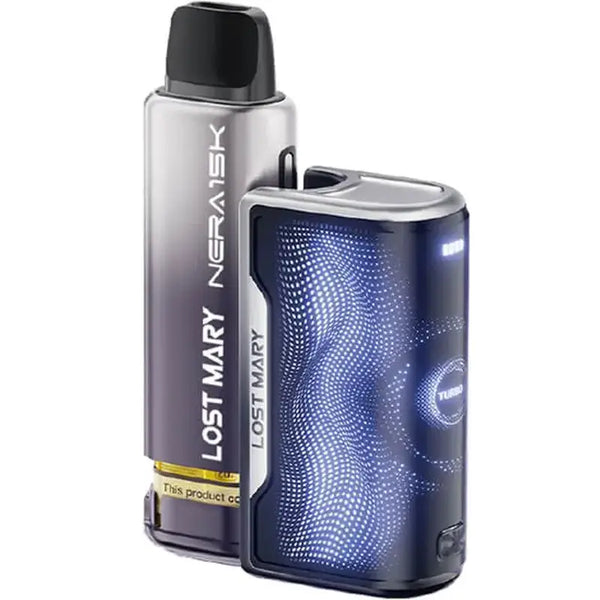
The Nera 30K is a rechargeable prefilled pod kit that uses a 10ml refill container to automatically top up the 2ml pod as you vape. It is powered by an 800mAh built-in battery, uses MaryLiq nic salt e-liquid at 20mg strength, and delivers a smooth mouth-to-lung (MTL) vaping experience.
The Fullview LED display shows your battery level and e-liquid status in real time, so you always know exactly where you stand. It comes in two variants, the standard Lost Mary Nera 30K and the Nera 30K Star Gazer, both available at Vaping 101 in a wide range of flavour editions.

How to Set Up the Lost Mary Nera 30K for the First Time
The kit arrives pre-assembled, so there is very little to do before your first vape. Here is how to get started:
- Charge the device first. Before using it for the first time, connect the USB-C cable to the port at the base of the device and charge until the LED display shows a full battery. This helps ensure consistent performance from the start.
- Check the pod is seated correctly. The pod and refill container should already be in place. Give the device a gentle check to make sure there are no obvious leaks before vaping.
- Select your output mode. The Nera 30K has two modes: Normal and Turbo. Press the mode button to choose your preferred setting. Normal Mode is recommended for first-time use.
- Start vaping. The Nera 30K is draw-activated, meaning there is no fire button to press. Simply inhale through the mouthpiece and the device will activate automatically.
How to Switch Between Turbo and Normal Mode
Device modesThe dual output system is one of the Nera 30K's most useful features. Normal Mode runs at a lower output, offering a smoother and more restrained draw with better battery efficiency. This is ideal for all-day vaping and for those who prefer a lighter hit.
Turbo Mode increases the output power, producing denser vapour and a more intense flavour hit. It will drain the battery faster but delivers a noticeably stronger experience.
To switch between modes, press the mode button on the device. The LED display will confirm which mode is active. Most vapers find Normal Mode sufficient for everyday use, with Turbo Mode reserved for when they want a stronger hit.

How the Auto-Refill System Works
Rather than manually refilling the pod, the 10ml refill container feeds e-liquid directly into the 2ml pod as you vape. This keeps the coil consistently primed, which reduces dry hits and maintains flavour quality throughout the life of the pod.
You do not need to do anything to activate this as it works automatically. When the refill container is empty, the LED display will show a low e-liquid warning, and at that point the pod and container will need to be replaced.

How to Charge the Lost Mary Nera 30K
Here is how to charge the device:
- Locate the USB-C port at the base of the device.
- Connect the USB-C cable to the port and plug the other end into a suitable power source such as a wall adapter or laptop.
- Monitor the LED display, which will show the battery level increasing as it charges.
- Disconnect once fully charged. The display will indicate when charging is complete. Avoid leaving the device charging unattended for extended periods.
Given the 800mAh battery capacity, expect to charge the device once a day or every other day depending on how frequently you vape. Heavy use in Turbo Mode will drain the battery faster than Normal Mode.

Lost Mary Nera Fullview 15K Prefilled Pods

How to Read the LED Display
The Fullview LED display is one of the most practical features on the Nera 30K. The battery level is displayed as a percentage or bar indicator so you always know when to charge, while the e-liquid level reflects how much liquid remains in the refill container.
The display also confirms whether you are currently in Normal or Turbo Mode, and will alert you with a low warning when either battery or e-liquid is critically low. Keeping an eye on the display is the easiest way to avoid dry hits and unexpected battery drain mid-vape.

When and How to Replace the Pods
When the refill container runs dry, it is time to swap in a fresh pod. The Lost Mary Nera 30K is compatible with Lost Mary Nera 15K Prefilled Pods. Here is how to do it:
- Remove the empty pod and refill container from the device.
- Select your new flavour from the Nera 15K pod range.
- Insert the new pod into the device until it clicks securely into place.
- Wait a minute or two before vaping to allow the coil to prime with fresh e-liquid.
- Start vaping as normal.
The Nera 15K pods are available in an extensive range of flavours including Cherry Ice, Blueberry Sour Raspberry, Triple Mango, Pineapple Ice, and Strawberry Watermelon. You can browse the full selection on the Lost Mary collection page at Vaping 101, where all products are sourced directly from Lost Mary to guarantee authenticity.
Shop the Lost Mary Nera 30K at Vaping 101
The Lost Mary Nera 30K is a well-designed kit that rewards you for learning its features. The auto-refill system removes most of the hassle associated with prefilled devices, while the dual output modes give you genuine control over your vaping experience. Once you are comfortable with the setup, it is a remarkably straightforward device to live with day to day.
Quick Comparison
| Feature / step | What it does | Best for | Format | Device detail | Shop |
|---|---|---|---|---|---|
| Lost Mary Nera 30K | Rechargeable prefilled pod kit | High puff count, simple daily use | 10ml refill container + 2ml pod | 800mAh battery / dual modes | Nera 30K |
| Nera 30K Star Gazer | Alternative Nera 30K edition | Different device style and flavour editions | Prefilled pod kit | Normal and Turbo Mode | Star Gazer |
| Nera 15K Pods | Replacement pod and refill container | Replacing an empty pod | Prefilled replacement pods | Compatible with Nera Fullview devices | Replacement pods |
| Lost Mary | Full Lost Mary collection | Browsing flavours and devices | Kits and pods | Prefilled pod options | Lost Mary |